Localization
XStandard ships with 22 language interfaces including English, French, German, Spanish, Chinese, Dutch, Italian, Czech, Russian and Swedish. All 22 interface languages are already enabled in the copy of XStandard that you downloaded.
To change the language of the editor's interface, change the localization code in the "Lang" param tag. For example, to switch to a German interface use:
- <param name="Lang" value="de" />
Modifying Localization Files
Making changes to one of the 22 existing interfaces, or creating an entirely new language version is easy.
To modify an existing interface, download and edit the appropriate localization file from the table at the end of this document.
If you are creating an entirely new language version, download the English localization file from the same table. This file has convenient "TODO" place-holders where you will insert the new language version, and "xx" placeholders where you will insert the new language code.
Once you have made changes to an existing language interface, or once you have created a new language version, put the new localization XML file on your Web server, and point to it as follows:
<param name="Localization" value="http://myserver/localization.xml" />
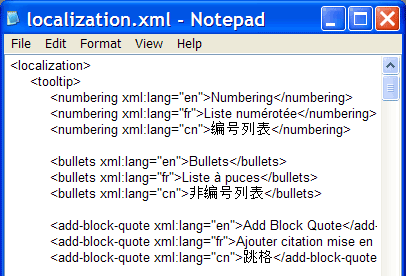
The localization XML document can store localization for one or several languages at the same time. Multilingual versions such as the one seen in the screenshot below, identify each language by an xml:lang attribute, and the <param> tag named Lang instructs the editor to pick the relevant language version from the localization file.
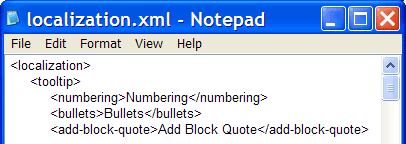
When a single language version of the localization file is used, xml:lang attributes are not necessary and the value from the <param> tag named Lang is ignored.
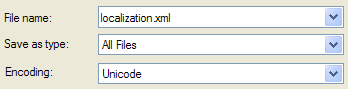
Note: Be sure to save your localization XML file in Unicode (UTF-16 or UTF-8). This will ensure that text in any language will save correctly. If you are editing the localization file in Notepad, when you select "Save As" from the File menu, choose "Unicode" or "UTF-8" as the type of "Encoding".
Below is a list of available localization files contributed by developers like you. If you would like to contribute a translation, please contact us.